
| Exam Code | AB-900 |
| Exam Name | Microsoft 365 Copilot and Agent Administration Fundamentals (beta) |
| Vendor | Microsoft |
| Total Questions | 75 |
| Last Updated | 15-Nov, 2026 |
- Latest & Verified Questions
- Detailed Explanations
- Regular Updates
- Full-Length Practice Tests
- Boost Your Exam Confidence
PDF Study Materials
Downloadable guides and resources
Practice Tests
Full-length tests with real exam experience
Progress Tracking
Monitor your performance and improvement
Study Anywhere
Access on desktop, tablet, and mobile
Free AB-900 Practice Questions
Explore 8 free practice questions for the Microsoft AB-900 exam and review the answers and explanations to support your preparation.
-
Question 1
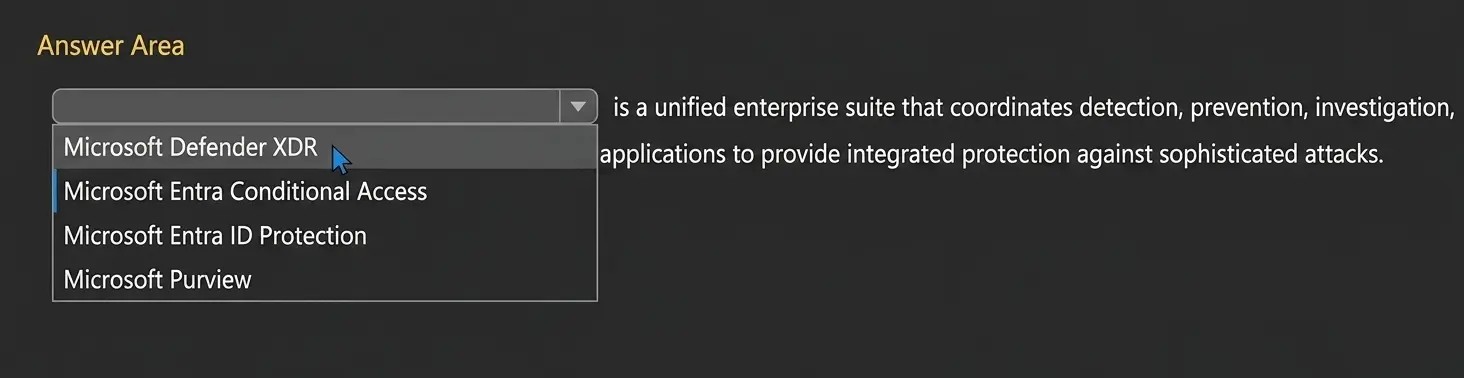
Drag & DropHOTSPOT Select the answer that correctly completes the sentence.
Show Answer & Explanation Hide Answer & Explanation
Correct Answer

Explanation
The correct answer is Microsoft Defender XDR. Microsoft Learn defines Microsoft Defender XDR as a unified pre- and post-breach enterprise defense suite that natively coordinates detection, prevention, investigation, and response across endpoints, identities, email, and applications to provide integrated protection against sophisticated attacks. That wording matches the sentence in the question almost exactly, which makes this the clearly correct choice. The other options do not fit that definition. Microsoft Entra Conditional Access is Microsoft’s Zero Trust policy engine used to evaluate signals and enforce access policies, not a cross-domain threat detection and response suite. Microsoft Entra ID Protection focuses on detecting and responding to identity risks such as risky sign-ins and risky users. Microsoft Purview is Microsoft’s portfolio for data governance, data security, and compliance. None of those products is described by Microsoft as coordinating detection, prevention, investigation, and response across endpoints, identities, email, and applications in the same integrated XDR manner. Therefore, the only answer that correctly completes the sentence is Microsoft Defender XDR.
-
Question 2
Multiple answersYour organization has a Microsoft 365 subscription. Which two tasks can you perform by using the Exchange admin center? Each correct answer presents part of the solution. NOTE: Each correct selection is worth one point.
-
Option A:Correct
Create a mail flow rule.
-
Option B:Correct
Add a custom domain.
-
Option C:Correct
Assign a Microsoft Exchange license.
-
Option D:Correct
Create a shared mailbox.
Show Answer & Explanation Hide Answer & Explanation
Correct Answer: A, D
Explanation
The correct answers are A and D because both tasks are supported directly in the Exchange admin center (EAC). Microsoft Learn states that administrators can manage mail flow rules in Exchange Online from the EAC under Mail flow > Rules, which includes creating and managing transport rules for organizational email handling. Microsoft Learn also states that administrators can create shared mailboxes in the EAC under Recipients > Mailboxes, where a shared mailbox can be added and then delegated to users. Option B is incorrect because adding a custom domain is normally done in the Microsoft 365 admin center, specifically on the Domains page. Although Exchange can later work with accepted domains and related mail flow settings, the act of adding and verifying a custom domain is not an Exchange admin center task. Option C is incorrect because license assignment is handled through Microsoft 365 or Microsoft Entra administrative tools, not the Exchange admin center
-
-
Question 3
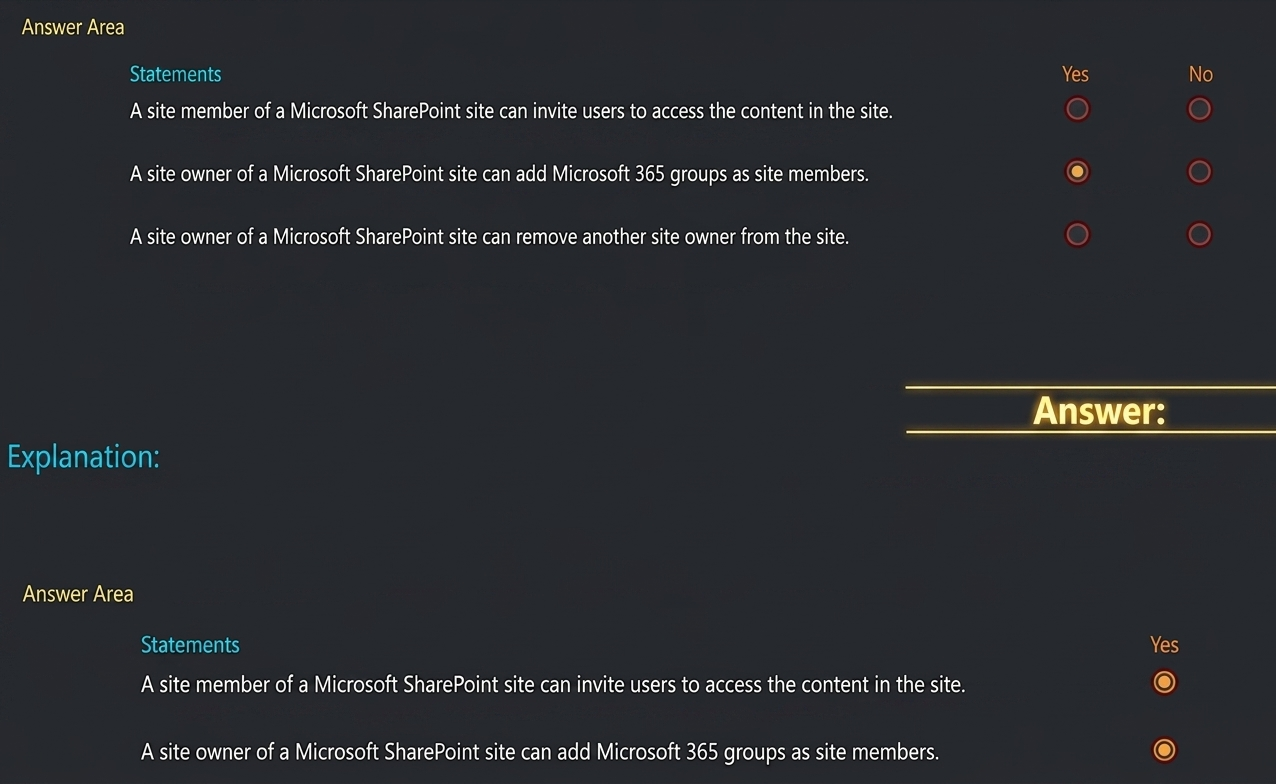
Drag & DropHOTSPOT
Chose the answerShow Answer & Explanation Hide Answer & Explanation
Correct Answer
Explanation
The correct selections are Yes, Yes, Yes. For statement 1, Microsoft Support explains that if you are not a site owner, you might still be able to invite other people to the site, although the invitation can generate an access request that a site owner approves or declines. Microsoft also states that site users have the opportunity to invite other people to collaborate on sites, unless that feature is disabled. That makes the statement true. For statement 2, Microsoft Learn states that in SharePoint you can give people permissions to a site by adding individual users, security groups, or Microsoft 365 groups to one of the three SharePoint groups, including the Members group. That directly supports the statement. For statement 3, Microsoft documents that site ownership and membership can be managed by adding or removing owners, members, site owners, site members, and site visitors. For group- connected sites, Microsoft also documents that owners can manage group ownership and remove owner status. Therefore, a site owner can remove another site owner, provided at least one owner remains.
-
Question 4
Single answerYour organization has a Microsoft 365 subscription.
You need to generate a report that shows the permissions and active sharing links of content stored in Microsoft OneDrive accounts.
What should you use?
-
Option A:Correct
Data access governance in the SharePoint admin center
-
Option B:Correct
Reports in the Microsoft 365 admin center
-
Option C:Correct
Audit in the Microsoft Defender portal
-
Option D:Correct
Show Answer & Explanation Hide Answer & Explanation
Correct Answer: A
Explanation
The correct answer is A. Data access governance in the SharePoint admin center . Microsoft Learn documents Data access governance reports in the SharePoint admin center as the reporting solution used to understand data exposure, including permission structure and sharing link activity . Microsoft specifically states that the site permissions snapshot report provides visibility across SharePoint and OneDrive sites , helping administrators understand current permissions exposure, and that separate reports are created for SharePoint and OneDrive . Microsoft also documents sharing links activity reports as part of Data access governance for monitoring link-sharing activity, and notes that OneDrive support is available through PowerShell for those reports. Together, this is the Microsoft reporting capability aligned with permissions and active sharing links for OneDrive content.
The other options do not fit this requirement. Microsoft 365 admin center reports focus mainly on usage and activity reporting, not detailed permissions and sharing-link governance. Defender Audit is for security investigation activity, and Purview eDiscovery is for legal and investigative content search, not for generating OneDrive permissions and sharing-link governance reports. Therefore, the best Microsoft-documented answer is Data access governance in the SharePoint admin center .
-
-
Question 5
Single answerYou need to identify files and emails that contain social security numbers (SSNs) and credit card numbers. What should you use in the Microsoft Purview portal?
-
Option A:Correct
Information Protection reports
-
Option B:Correct
Data explorer
-
Option C:Correct
Information Protection policies
-
Option D:Correct
Show Answer & Explanation Hide Answer & Explanation
Correct Answer: B
Explanation
The correct answer is B. Data explorer. Microsoft Learn states that Data explorer in Microsoft Purview shows a current snapshot of items that have been classified as a sensitive information type in your organization. Microsoft’s sensitive information type documentation specifically lists examples such as social security numbers and credit card numbers, which means Data explorer is the appropriate portal feature for identifying files and emails that contain those data types. Data explorer is designed to help administrators see where sensitive data exists across supported Microsoft 365 locations.
The other options are less appropriate for this task. Information Protection reports focus more broadly on label and protection reporting. Information Protection policies are for configuring classification and protection behavior, not for finding existing files and emails containing SSNs or credit card numbers. Activity explorer is primarily used to review user and policy-related activities, such as label changes or DLP events, rather than to provide the direct sensitive-data inventory view requested here. Since the question asks to identify the files and emails containing specific sensitive information types, Microsoft’s documented answer is Data explorer.
-
-
Question 6
Single answerYour organization has a Microsoft 365 subscription that uses Microsoft Entra ID. You have a custom web app named App1.
Users automatically authenticate to App1 by using their Microsoft Entra credentials, without manually entering their credentials.
What is this an example of?
-
Option A:Correct
multifactor authentication (MFA)
-
Option B:Correct
password synchronization
-
Option C:Correct
pass-through authentication
-
Option D:Correct
Show Answer & Explanation Hide Answer & Explanation
Correct Answer: D
Explanation
The correct answer is D. single sign-on (SSO). Microsoft Entra single sign-on lets users sign in once with one set of credentials and then access assigned applications without signing in again. In this scenario, users authenticate to App1 automatically by using Microsoft Entra credentials, so the app is relying on the tenant identity provider rather than requiring separate app credentials. Multifactor authentication is an additional verification step, not the automatic reuse of an authenticated session. Password synchronization synchronizes password hashes between identity stores, and pass-through authentication validates credentials against on-premises Active Directory. Neither describes the user experience shown here. The key wording is “without manually entering their credentials,” which maps directly to SSO.
-
-
Question 7
Single answerYou are reviewing your company ' s security policies as part of a Zero Trust strategy. Which statement accurately describes the Zero Trust principles?
-
Option A:Correct
Zero Trust assumes breach and verifies each request.
-
Option B:Correct
Zero Trust enhances the user experience by minimizing authentication prompts.
-
Option C:Correct
Zero Trust removes the need to regularly review and adjust access permissions.
-
Option D:Correct
Show Answer & Explanation Hide Answer & Explanation
Correct Answer: A
Explanation
The correct answer is A . Microsoft Learn defines Zero Trust as a security strategy built on the principles verify explicitly , use least privilege access , and assume breach . Microsoft also summarizes Zero Trust as a model that assumes breach and verifies every request , rather than trusting users, devices, or traffic simply because they originate from inside the corporate network. This is the key reason option A is correct. Under Zero Trust, every access request should be evaluated continuously using available signals such as identity, device state, location, service, and risk.
Option B is incorrect because improving user experience is not the defining principle of Zero Trust. Option C is incorrect because Zero Trust requires ongoing review and adjustment of permissions, especially through least privilege and risk-based access. Option D is incorrect because Zero Trust explicitly rejects implicit trust based on network location. Microsoft states that organizations should reduce reliance on the traditional idea that anything on the internal network is automatically safe or trustworthy.
-
-
Question 8
Single answerYour organization has a Microsoft 365 subscription.
All users have Microsoft 365 Copilot licenses.
You need to identify where sensitive content is being used during Copilot interactions, analyze the content usage patterns, and provide recommendations on applying the appropriate protections.
What should you use?
-
Option A:Correct
Microsoft Viva Insights
-
Option B:Correct
the Microsoft Purview DSPM for AI solution
-
Option C:Correct
Microsoft Security Copilot
-
Option D:Correct
Show Answer & Explanation Hide Answer & Explanation
Correct Answer: B
Explanation
The correct answer is B. the Microsoft Purview DSPM for AI solution . Microsoft documents that Data Security Posture Management for AI (DSPM for AI) in Microsoft Purview provides a central place to secure data for AI apps and proactively monitor AI use , including Copilots and agents . Microsoft also states that DSPM for AI helps organizations identify where sensitive content is used in AI interactions , review Copilot prompts and responses , analyze usage patterns , assess exposure and oversharing risks, and get recommendations for protections such as sensitivity labels and DLP policy coverage.
The other options do not fit this requirement. Microsoft Viva Insights focuses on productivity and work-pattern analytics, not sensitive-data protection in Copilot interactions. Microsoft Security Copilot is a security assistant for analysts, not the Purview governance solution that analyzes sensitive content use in Copilot and recommends data protections. Insider Risk Management is for identifying risky user behavior, not for broad AI interaction posture analysis and protection recommendations. Microsoft specifically positions DSPM for AI as the “front door” for discovering, monitoring, and protecting AI-related data usage in Microsoft 365 Copilot.
-